Getting started with hotkeys

If you’re coming from my Substack publication, titled “The magic of hotkeys”, welcome! If not, you don’t need to read it to get started today.
To recap:
Hotkeys are optional and they seem like a pain but they save your focus.
These set of hotkeys will be most helpful in situations that require a lot of text:
- Creating, editing, or proofreading documents with heavy texts. Pretty much anything that requires something like Google docs or Word: think resume, slideshow, or an essay.
- Emails and Chats
- Crafting a social media posts and messages
- Chatting with AI tools like ChatGPT or Claude
Let’s jump in. These hotkeys have been handpicked, grouped by utility, and organized by frequency starting from most to least used. It’s recommended you build on them in the order as they’re written.
Use them in situations in the list above, don’t try them without a purpose.
If you’re not doing any of the above or similar, save this post for when you are.
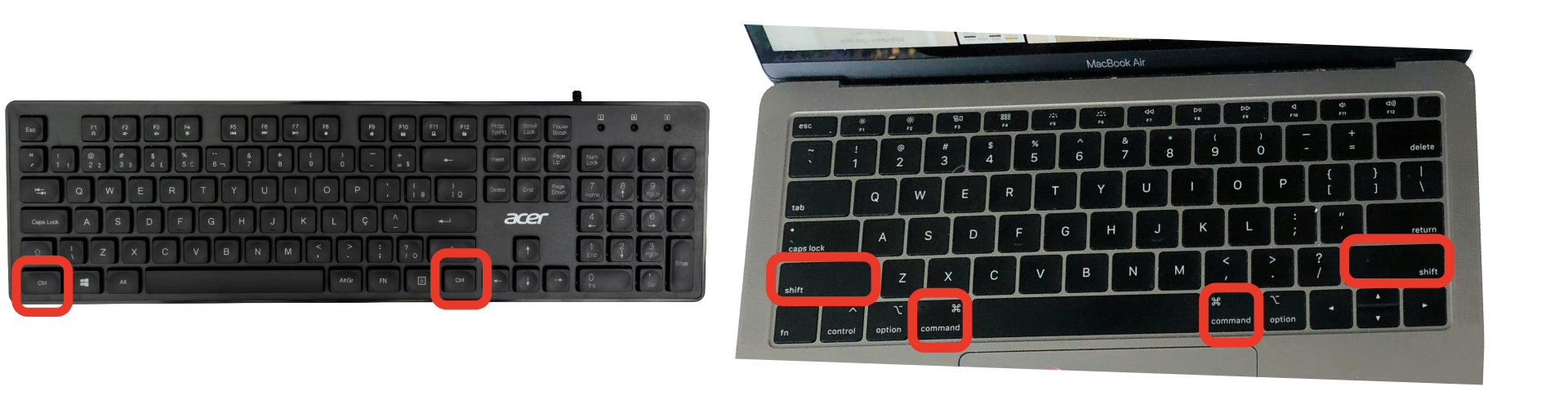
You’ll mostly rely on the control (ctrl) or command button for Mac for these hotkeys. It’s found on either side of your space bar, use either one. I tend to use the one on the left for no reason other than comfort. You do not need to press all keys at once, do it consecutively but always start with control/command (⌘).
Copy and paste
Organize your thoughts and ideas via duplication
Copy
- Highlight text
- Copy: ctrl/command ⌘ + C
Paste:
- Set cursor location
- Paste: ctrl/command ⌘ + V
Cut and paste
Organize your thoughts and ideas via restructuring
Cut
- Highlight text
- Cut: ctrl/command ⌘ + C
Paste
- Set cursor location
- Paste: ctrl/command ⌘ + V
Highlight
Select text you’d like to manipulate
- Set cursor location
- Highlight: ctrl/command ⌘ + V
Undo and Redo
Restore and apply edits from recent history
Undo
- ctrl/command ⌘ + Z
Redo (PC)
- ctrl + Y
Redo (Mac)
- command ⌘ + shift + Y
Hotkeys are one of those small habits that make everything else easier.
If you want to build these habits while learning the basics of a website in a supportive and live setting with a trained educator, join our workshop: Claim Your Corner of the Internet and will receive a gift to register your own domain name, to make your new site (or any other ideas) live.